

Department Resources
Resources for department employees. For security reasons, access may require net id login.
- By-Laws, Policy and Procedure / Courtesy Committee
-
Computer / IT Support / Microsoft 365 / Software - Requests/Renewals
Email Handbook
Department How to for using department related features of MSU email (distribution lists, conference room booking etc,)
Microsoft 365 (Word, Outlook, Excel, Access)
This is free to anyone who is actively a student or employed at MSU. Login and download.
Steps to Download 365:
- Access the Portal: Go to spartan365.msu.edu or portal.office.com.
- Sign In: Enter your full MSU email address (netid@msu.edu) and password.
- Verify: Complete the multi-factor authentication (MFA) process.
- Look for Apps on the left side
- Install: Click the "Install Apps" at the top of the page
- Run Installer: Open the downloaded file and follow the on-screen instructions.
For Help: Contact the IT Service Desk at (517) 432-6200 if you face issues.
IT Readiness form
Do you need a better understanding of the MSU IT Readiness form?
MSU IT has created an Approved Software List (Tiers 1 – 3), which allows employees to purchase select software without the submission of an IT Readiness form. The IT Readiness form must be submitted via requisition for the following types of IT purchases:- Hardware
- Tier 1 software, if the cost is above the cardholder's single transaction purchase limit or if the software will process or store confidential information
- Tier 2 software, if the cost is above the cardholder's single transaction purchase limit or the user type/use case isn't met
- Tier 3 software, even if it is free software
- Note: Purchases made through the MSU Tech Store do not require an IT Readiness form.
Technical Support - Computer issues, classroom issues, Spartan 365, etc.
Purchase computers, printers, keyboards, software, etc., through MSU.
- Out‑of‑pocket purchases for computer hardware and software are no longer reimbursable by the university. All items must be ordered through the department.
- The MSU store mainly offers Mac and Dell computers.
- If you are considering another option, contact Mark
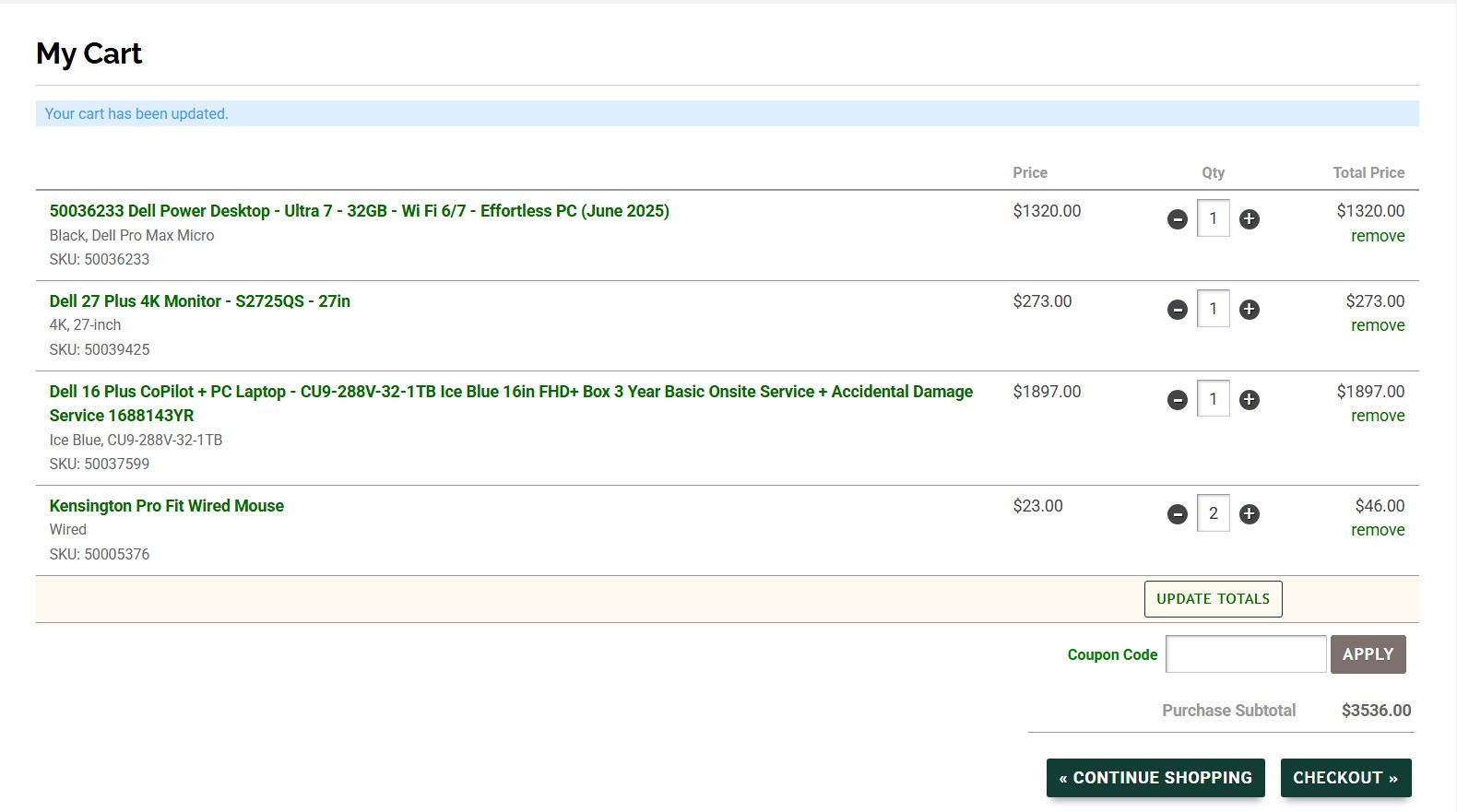
- Select the item(s) you would like to purchase.
- Screenshot your order (see example below) and send the screenshot to Mark (include account to be charged if known)
To request MSU IT purchase your equipment
Software Requests/Renewals
Access the form to request software licences or renewals for programs such as SAS. SPSS, etc.
Additional support areas
- ICER, Institute for Cyber Enabled Research
(High performance compute/research tools) The Institute for Cyber-Enabled Research (ICER) houses MSU's High-Performance Computing Center (HPCC) and provides user support to facilitate computational and data science research and instructional activities. ICER provides training, consulting, and the development of hardware and software infrastructure solutions.
- Health College Research Services
Health Colleges Research Services (HCRS) provides pre- and post-award support to units in the Colleges of Human Medicine, Osteopathic Medicine, and Nursing.
- Funding Requests
-
Research
This finding aid has been developed to assist new investigators and is organized in a sequential manner from securing funding and building your team, to compliance and technology transfer. Please review the outline below and refer to it often.
- Stationary (dept letterhead)
- Travel Request
-
MDHHS Newsletter
These newsletters provide a quarterly update for public health professionals, academics, health care providers and anyone interested in population health in the state of Michigan.